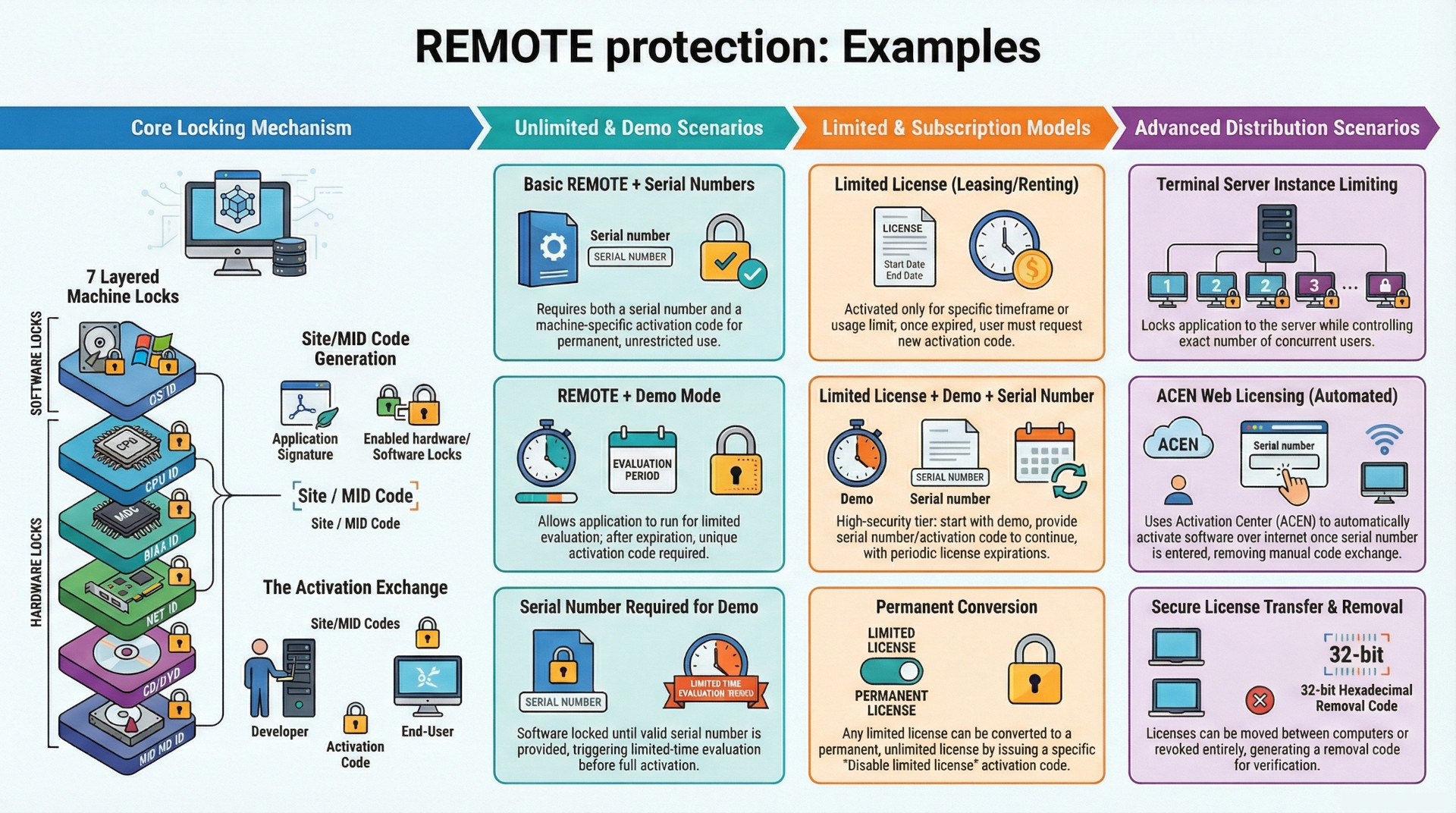
REMOTE protection system is a comprehensive software licensing and copy protection solution designed to securely lock an application to a specific remote computer, thereby preventing unauthorized distribution and use. Its core function relies on generating a unique computer identifier (Site/MID codes) based on a configurable set of seven hardware and software parameters. This system facilitates a robust activation process, which is offline by default but can be fully automated online via the Activation Center (ACEN).
The system is highly flexible, supporting a wide array of licensing models. These include standard perpetual licenses, pre-activation trial periods (demo mode) with extensible evaluation times, and post-activation limited licenses for subscription or rental scenarios. Crucially, it provides end-users with secure, managed capabilities for license removal and transfer between machines. License parameters on activated applications can also be remotely updated through a dedicated license extension feature. The modular design allows for numerous combinations, such as requiring serial numbers, limiting concurrent instances on terminal servers, or integrating demo modes with limited licenses to create sophisticated software distribution strategies.
I. Core Protection Mechanism
The foundation of REMOTE protection is its ability to uniquely identify a host computer and bind an application's license to it. This is achieved through a multi-stage process involving machine locking, code generation, and activation.
A. Machine Locking and Identification
The system locks an application to a computer by creating a unique digital fingerprint based on the machine's characteristics.
- Site/MID Codes: When a protected application is run on a new computer, it generates a unique pair of Site/MID codes. This pair serves as the computer's unique ID for that specific application. If the application is moved to another computer, a different Site/MID code pair will be generated.
- Application Signature: The Site/MID codes are based not only on the machine's hardware but also on an "application signature" value, which uniquely identifies the protected application's project files.
- Locking Parameters: There are seven distinct parameters, or "locks," that can be used to generate the machine ID. These are divided into two categories:
- Software Locks: HD ID, OS ID
- Hardware Locks: HD ID (HW), CD/DVD, NET ID, CPU ID, BIOS ID
- Configuration and Flexibility:
- Mandatory Locks: Any lock can be marked as mandatory. If the protection code cannot obtain the value for a mandatory lock on the user's system, an error message is displayed.
- Changeable Locks: By default, any change in the selected locking parameters will reset the license and require reactivation. However, individual hardware locks can be flagged as "Changeable." This allows the protection code to tolerate a certain number of hardware changes, as defined by a "maximum number of allowed hardware changes," before triggering a license reset.
- Machine ID Decoding: A feature within the activation panel allows for the decoding of a Machine ID to see the individual lock values from the remote computer, which helps in verifying user requests for new activation codes.
B. The Activation Process
Activation is the process of validating a user's right to use the software on a specific machine through an exchange of codes.
- The end-user runs the protected application, which generates and displays the unique Site/MID codes for their computer.
- The user submits these codes to the software vendor.
- The vendor uses the Site/MID codes to generate a corresponding, valid activation code.
- The user enters this activation code into the application to unlock it for permanent use on that machine.
By default, this process does not require an internet connection and can be completed via phone, fax, or email. For automated, internet-based licensing, the system can be integrated with the Activation Center (ACEN).
II. Pre-Activation Licensing: Demo Mode
REMOTE protection allows for the implementation of a trial or evaluation period before a full activation is required.
- Functionality: If demo mode is enabled, the user can run the application for a limited time (e.g., 30 days) or a limited number of times (e.g., 100 runs) before it requires activation. Activation can be performed at any point during or after this trial period.
- Demo Extension: The evaluation period can be extended. This is done by issuing the user an activation code with a special "Extend evaluation period" flag enabled. This grants the user an additional trial period based on the original demo limitations.
III. Post-Activation License Management
The system provides robust features for managing a license after the application has been successfully activated. The activation dialog for accessing these features can be configured to appear on every application run or only when the user toggles a special key before launch.
A. License Removal
An activated license can be securely removed from a computer, freeing it up for use elsewhere.
- Process: The user can initiate removal manually via the activation dialog or programmatically through the
RemoveLicense()function. - Confirmation: Upon successful removal, a 32-bit hexadecimal removal code is generated and displayed to the user as proof of deactivation.
B. License Transfer
An activated license can be securely transferred from one computer to another.
- Process: This can be initiated by the user via the activation dialog or programmatically using the
TransferLicense()function. - Outcome: Once the transfer is complete on the original machine, an activation code for the new computer is generated and presented to the user.
IV. Advanced Licensing Models
Beyond simple activation, REMOTE protection supports more complex and recurring revenue models.
A. Limited Licenses
This feature is designed for software rental, leasing, or subscription models where permanent activation is not desired.
- Mechanism: A limited license imposes additional restrictions on an activated application (e.g., time limits, usage counts). Once any limit is reached, the license expires.
- Reactivation: Upon expiration, the application generates a new, different set of Site/MID codes and requires a new activation code.
- Conversion to Permanent: A limited license can be converted into a permanent, unlimited one at any time by applying an activation code with the "Disable limited license" flag enabled.
B. License Extension
This feature allows for updating the parameters of an already activated license without requiring a full reactivation.
- Purpose: It can update custom features, custom counters, license limitations, and the maximum number of allowed application instances.
- Activation Codes: The feature uses specific "license extension activation codes."
- Standard Activation Code: Updates only the license validity period and number of runs limitations with the default values set during protection.
- Extended Activation Code: Can update the full range of custom features, counters, and other limitations.
V. Protection Scenarios and Combinations
The REMOTE protection system's features can be combined to create a wide variety of specific licensing scenarios, as illustrated in the following examples.
| # | Scenario | Description | Key Features Used |
| 1 | Basic REMOTE | Application requires a unique activation code for each computer for unlimited use. | REMOTE |
| 2 | REMOTE + Serial Numbers | Requires both a serial number and a machine-specific activation code. | REMOTE, Serial Numbers |
| 3 | REMOTE + Demo | Application runs in a trial mode before requiring machine-specific activation. | REMOTE, Demo |
| 4 | REMOTE + Demo + Serial Numbers | Requires a serial number and activation code after a trial period expires. | REMOTE, Demo, Serial Numbers |
| 5 | SN Required for Demo | A valid serial number is required to start the demo period. Activation is required after the demo expires. | REMOTE, Demo, Serial Numbers |
| 6 | REMOTE + Limited License | Application works for a limited period after activation and then requires a new activation code. | REMOTE, Limited License |
| 7 | Limited License + Serial Numbers | Requires a serial number and activation code for limited use. | REMOTE, Limited License, Serial Numbers |
| 8 | Limited License + Demo | Application has a trial period, after which activation provides a time-limited license. | REMOTE, Limited License, Demo |
| 9 | Limited License + Demo + SN | A combination of a trial, serial numbers, and a time-limited license post-activation. | REMOTE, Limited License, Demo, Serial Numbers |
| 10 | SN Required for Demo + Limited License | Requires a serial number to start the demo. Post-demo activation provides a limited license. | REMOTE, Limited License, Demo, Serial Numbers |
| 11 | Limit Application Instances | Locks the application to a server (e.g., a terminal server) and controls the number of concurrent users. Can be combined with other models. | REMOTE, Instance Limiting |
| 12 | ACEN Web Licensing | Requires a serial number, after which the application automatically activates over the internet by contacting the Activation Center (ACEN). | REMOTE, Serial Numbers, ACEN |