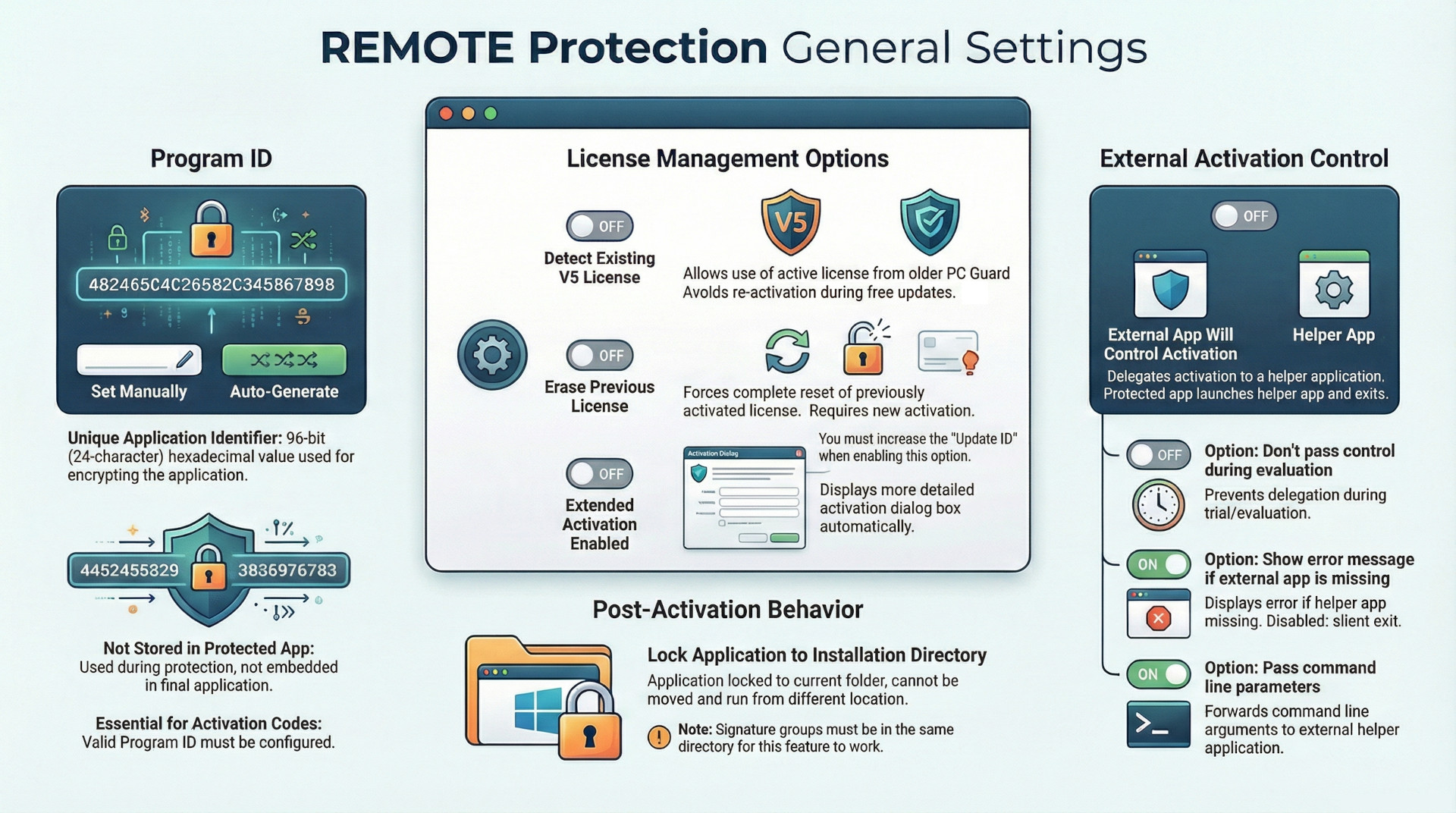
The following briefing outlines the core configuration parameters and functional logic governing remote software protection within the PC Guard ecosystem. The system utilizes a unique 96-bit Program ID for application encryption and provides robust mechanisms for managing license lifecycle transitions. Key capabilities include backward compatibility with legacy Version 5 (V5) licenses, strict installation directory locking, and the ability to offload the activation process to external applications. Effective implementation relies on the strategic use of Update IDs to manage license resets and the careful orchestration of application signatures to ensure seamless user transitions during product updates.
Core Application Identification
The Program ID
The Program ID serves as the fundamental identifier for application encryption within the remote protection method.
- Format and Structure: It is a 96-bit hexadecimal value, represented as a 24-character string containing numerals (0-9) and letters (A-F).
- Generation: Users may define this ID manually or utilize the PC Guard interface to generate a random value automatically.
- Security and Storage: Critically, the Program ID is not stored within the protected application during the protection process. However, a valid Program ID is mandatory for the generation of activation codes.
License Lifecycle and Compatibility Management
Legacy V5 License Integration
PC Guard provides an optional feature to detect and utilize existing Version 5 licenses, primarily to facilitate free application updates without requiring user reactivation.
- Detection Logic: The protected application performs a one-time check for a V5 license during its initial run on a remote machine. If a newer V6 license is already present, the V5 check is bypassed.
- Activation States: Only active V5 licenses are recognized; licenses in demo mode or a locked state are ignored.
- Independence: Upon successful detection of an active V5 license, the V6 application automatically activates. The V5 and V6 licenses remain distinct and independent; modifications to one do not impact the other, allowing users to run both versions simultaneously on the same hardware.
License Erasure and Resetting
To force a license reset on a remote computer, the "Erase previous license" option can be deployed.
- Update ID Requirement: This feature is governed by the "Update ID." A license will only be reset if the Update ID of the new version is higher than the existing one; older updates cannot reset newer licenses.
- Functional Impact: Enabling this feature reinitializes limited license parameters and causes the application to generate new Site/MID codes, necessitated by a request for a new activation code.
Security and Environmental Constraints
Installation Directory Locking
This security measure binds a protected application to the specific directory where it was located at the time of activation.
- Operational Restriction: Once activated, the application will fail to run if moved to a different directory.
- Group Configuration: If multiple programs share the same application signature and have directory locking enabled, they must all be maintained within the same directory to function correctly.
External Activation Control
For applications lacking the technical capacity to utilize the protection interface directly, PC Guard allows the delegation of the activation process to an external application.
Operational Parameters for External Control
| Feature | Default Status | Description |
| Pass Control | OFF | Protection code exits and hands control to a designated external app. |
| Don't Pass Control During Evaluation | OFF | Prevents external delegation while the software is in its evaluation period. |
| Show Error Message | ON | Displays an error if the designated external application is missing. |
| Pass Command Line Parameters | ON | Forwards command line arguments from the protected app to the external app. |
Technical Requirements: The external application responsible for handling the activation must reside in the same directory as the protected application.
Summary of Default Configuration Settings
The following table summarizes the default states of general remote protection settings:
| Setting | Default State |
| Extended Activation Enabled | OFF |
| Detect Existing V5 License | OFF |
| Erase Previous License | OFF |
| Lock Application to Installation Directory | OFF |
| External Application Control | OFF |
| Show Error if External App Missing | ON |
| Pass Command Line Parameters | ON |