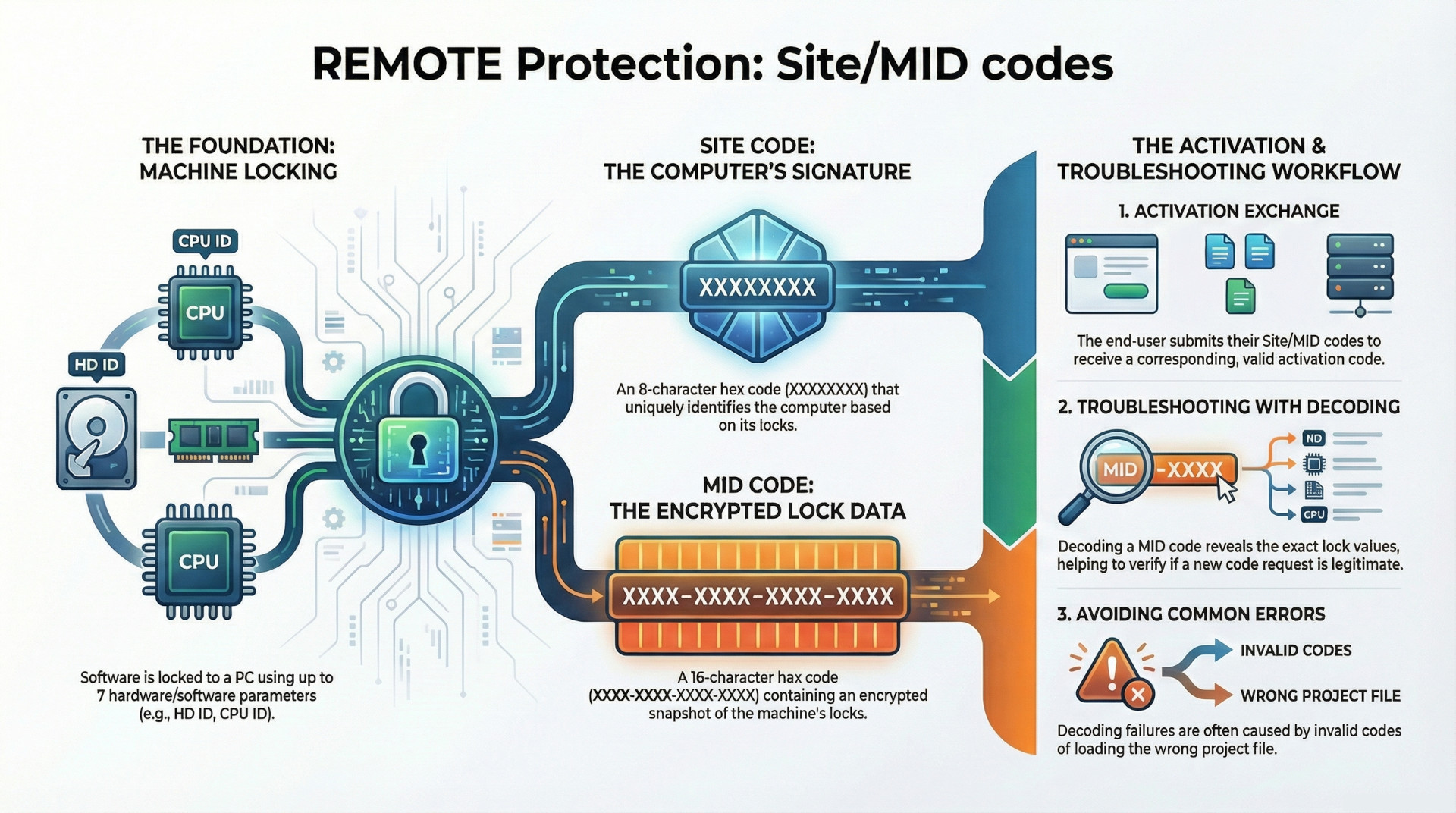
This blog post provides a comprehensive overview of a software activation and machine locking system designed to prevent unauthorized application use. The core of the system is machine locking, a process that links a protected application to a specific computer. This link is established using a unique computer signature derived from seven distinct software and hardware parameters, known as "locks."
The activation process requires an exchange between the end-user and the software provider. The user's computer generates a unique Site Code and an encrypted Machine ID (MID) Code. The user submits these codes, and the provider returns a corresponding activation code to unlock the software on that specific machine. Moving the software to a new computer generates a different set of codes, necessitating a new activation.
A key feature of this framework is the ability to decode the MID code, which decrypts the hardware and software lock values from the user's machine. This allows for detailed analysis of system changes, enabling support staff to make informed decisions when users request new activation codes due to legitimate events like hardware failure. The system is highly configurable, allowing for mandatory locks, customizable license reset behavior based on hardware changes, and both offline (phone, fax) and automated online activation methods.
1. Machine Locking Principles
Machine locking is the fundamental process of linking a protected application to a remote computer to prevent its illegal use across multiple machines. This is accomplished by generating a unique computer signature based on a defined set of system parameters.
Locking Parameters
The system utilizes seven distinct locking parameters to create the computer's unique signature. These are categorized as either software or hardware locks.
| Category | Lock Name | Description |
| Software | HD ID | Software-based Hard Drive Identifier |
| Software | OS ID | Operating System Identifier |
| Hardware | HD ID (HW) | Hardware-based Hard Drive Identifier |
| Hardware | CD/DVD | CD/DVD Drive Identifier |
| Hardware | NET ID | Network Interface Card Identifier |
| Hardware | CPU ID | Central Processing Unit Identifier |
| Hardware | BIOS ID | Basic Input/Output System Identifier |
The Site and MID codes generated by the application are based on which of these locks are enabled, in combination with a unique Application Signature value that identifies the specific protected application.
Configuration and Behavior
The machine locking behavior can be customized to control how the application responds to system changes.
- Mandatory Locks: Any lock can be marked as mandatory. If the protection code cannot obtain the value of a mandatory lock on the user's computer, it will display an error message and prevent the application from running.
- License Reset on Change: By default, any change detected in one of the selected locking parameters will cause the application to reset its license. This erases the current license, generates new Site/MID codes, and requires the user to obtain a new activation code.
- Flexible Licensing: This default reset behavior can be modified.
- 'Changeable' Flag: If a lock's 'Changeable' flag is selected, the protection code will permit changes to that specific parameter without an immediate license reset.
- Maximum Hardware Changes: When multiple hardware locks are marked as 'Changeable', the license will not reset as long as the cumulative number of hardware changes remains below a predefined maximum limit.
2. The Activation Process
Software activation involves the secure exchange of keys between the software provider and the end-user to authorize the application on a specific machine.
Activation Workflow
- The protected application, running on an end-user's computer, generates a unique pair of codes: the Site Code and the Machine ID (MID) Code.
- The end-user submits these codes to the software provider.
- The provider uses these codes to generate a corresponding valid activation code.
- The provider sends the activation code back to the user, who enters it into the application to complete the activation.
If the application is moved to a different computer, it will generate a new set of Site/MID codes, rendering the original activation code invalid and requiring a new activation cycle.
Activation Methods
The system is designed for flexibility and does not require an internet connection by default.
- Offline Activation: The exchange of codes can be conducted securely via phone, fax, or e-mail.
- Automated Activation: The entire process can be fully automated using the Activation Center (ACEN), an online solution.
3. Site and Machine ID (MID) Codes
The Site and MID codes are the cornerstones of the activation system, representing a unique snapshot of the user's machine configuration as it relates to the protected application.
Code Structure and Generation
| Code | Format | Description |
| Site Code | XXXXXXXX | A 32-bit hexadecimal number representing the unique computer signature. It is an 8-character, zero-padded string (e.g., A1B2C3D4). |
| MID Code | XXXX-XXXX-XXXX-XXXX | An encrypted digital representation of the locking parameter values from the remote computer. It is composed of four 16-bit hexadecimal values (e.g., A19F-8A20-019D-19A8). |
Code Dependencies and Uniqueness
The generation of Site/MID code pairs is governed by several factors:
- Computer Hardware/Software: The primary determinant is the set of enabled locking parameters on the user's machine.
- Application Signature: The codes are also tied to the application's unique signature. This prevents a user from mistakenly using the wrong project settings to generate an activation code.
- Uniqueness Rules:
- Applications sharing the same Application Signature will generate the same Site/MID code pair on the same computer.
- Applications with different Application Signatures will generate different Site/MID codes on the same computer.
- License State: When a license is removed from an application, it will generate a new and different set of Site/MID codes on its next run, even on the same computer.
Unified Code Display
An optional setting, "Merge Site/MID codes into single code" (default: OFF), can alter how these codes are presented to the end-user.
- Function: When enabled, it combines the two codes into a single string for display in the activation dialog and the PC Guard activation panel.
- Format:
SITE-MID (XXXXXXXX-XXXX-XXXX-XXXX-XXXX) - Impact: This is a purely visual change. The MID code field is hidden, and the Site code field is expanded to accommodate the merged value.
4. Machine ID (MID) Decoding and Analysis
Because the MID code is an encrypted representation of the machine's lock values, it must be decoded to be analyzed. This capability is critical for customer support and license management.
Purpose of Decoding
The primary purpose of decoding a Site/MID code pair is to "track changes in locks on remote computer." By comparing the decoded lock values from an original activation with those from a new request, a provider can determine exactly what has changed on the user's system.
Use Case Example: A user's hard drive fails. They replace it and reinstall the software. The application now generates new Site/MID codes and requires a new activation. By decoding both the original and new MID codes, the provider can see that only the Hard Drive ID lock has changed, confirming the user's story and justifying the issuance of a replacement activation code.
Decoding Methods
- Manual Decoding: This can be performed in the PC Guard activation panel. By entering the Site and MID codes and clicking the
DECODEbutton, the system reveals the values for each lock. A decoded output might show values likeHD ID = 661,OS ID = 44, andBIOS ID = 681, with other locks showing a value of zero if they were disabled or could not be obtained. - Automated Decoding: The Activation Center (ACEN) automates the process of decoding and comparing machine locks, allowing users to reactivate licenses based on administrator-defined rules.
Troubleshooting Decoding Errors
Several issues can cause a "Machine ID (MID) decryption error" during the decoding process.
| Reason | Solution |
| Invalid Site or MID Code | The provided codes are incorrect. They must be hexadecimal (0-9, A-F). The user should be instructed to copy and paste the codes to avoid transcription errors. This can also be automated via the application's protection interface. |
| Codes from Older PC Guard Version | The codes were generated by an application protected with the older V5 version of PC Guard. The V5 option must be checked in the activation panel to ensure correct decoding. |
| Wrong Project Loaded | The project settings currently loaded in PC Guard do not match the application that generated the codes. The correct project file must be loaded before attempting to decode the codes or generate a new activation code. |