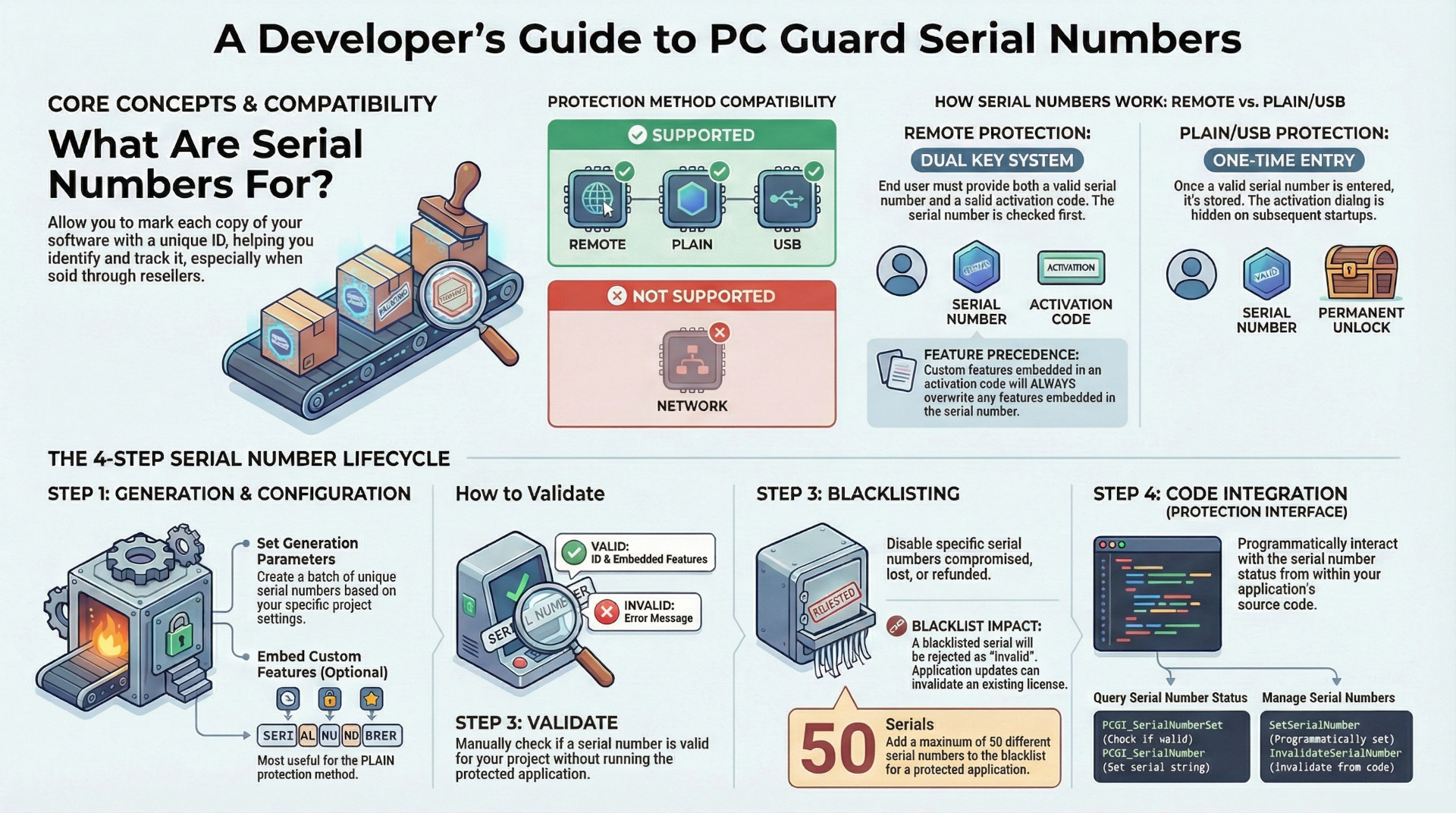
The Serial Numbers feature in PC Guard is a comprehensive system designed to identify and track individual copies of protected software, proving particularly useful when software is distributed through indirect channels like resellers or retail stores. This feature is compatible with the REMOTE, PLAIN, and USB protection methods but is explicitly unavailable for the NETWORK protection method.
Key capabilities include the generation of up to 65,535 unique serial numbers in a single batch, the ability to embed custom application features directly into these serials, and a blacklisting system to disable up to 50 specific serial numbers. The behavior of serial numbers varies significantly by protection method: with REMOTE protection, they serve as the first step in a two-factor activation process alongside an activation code, while with PLAIN and USB protection, a valid serial number is entered once, stored permanently, and subsequently suppresses the activation dialog.
The system is highly configurable, relying on a 64-bit seed value for generation and offering detailed output options. Furthermore, it integrates with PC Guard's protection interface, allowing the protected application to programmatically query serial number status and features, as well as set or invalidate the current serial number.
1. Core Functionality and Use Cases
The primary function of the serial numbers feature is to mark each copy of a protected application with a unique identifier. This is especially valuable in scenarios where software media is sold indirectly, allowing for better tracking and management of individual licenses.
Key capabilities include:
- Custom Feature Embedding: Specific application features can be embedded directly into a serial number.
- Limited Validity: It is possible to configure the software so that only a limited number of serial numbers are considered valid.
- Customizable Messages: Default notification messages related to serial numbers can be modified using the language editor.
Compatibility with Protection Methods:
The availability of the serial numbers feature is dependent on the chosen protection method.
| Protection Method | Serial Number Support |
| REMOTE | Supported |
| PLAIN | Supported |
| USB | Supported |
| NETWORK | Not Supported |
2. Behavior Across Protection Methods
The implementation and user experience of serial numbers differ based on the active protection method.
2.1 REMOTE Protection
Under the REMOTE protection method, serial numbers are part of a two-step activation process.
- Dual Requirement: Successful activation requires the end-user to provide both a valid serial number and a valid activation code.
- Validation Order: The system first checks the validity of the serial number. Only if the serial is valid will the application proceed to check the activation code.
- Feature Precedence: If features are embedded in both the serial number and the activation code, the features from the activation code will always overwrite those from the serial number.
2.2 PLAIN / USB Protection
For PLAIN and USB protection methods, the serial number acts as a one-time activation key.
- One-Time Entry: Once an end-user provides a valid serial number, it is stored on the computer, and the user is not prompted to enter it again. The activation dialog is no longer displayed on startup.
- Immutability: The serial number cannot be changed by the end-user after it has been set.
- Interface Access: The serial number's value and the status of any custom features embedded within it can be retrieved programmatically via the protection interface.
3. Configuration and Generation
Serial numbers are generated through a dedicated settings dialog that offers precise control over the process.
3.1 Generation Process
The step-by-step procedure for generating serial numbers is as follows:
- Open the serial number options dialog and select the "Enable serial numbers" option.
- Enter a 64-bit hexadecimal "Seed value" or generate a random one.
- Set the interval of serials to generate, with a valid range from 1 to 65,535.
- Optionally, select "Embed features" and choose the appropriate features from the features window, which must remain open during generation.
- Set the full path for the output filename.
- Click the "Generate" button to create the serial numbers and save them to the specified file.
- The output file can be reviewed in notepad directly from the interface.
3.2 Configuration Settings
| Setting | Description |
| Enable serial numbers | Activates the serial numbers feature for the selected protection method. |
| Serials to generate | Defines the range (First and Last ID) of serial numbers to be generated. The interval can be any value from 1 (min) to 65,535 (max). |
| Seed value | A 64-bit hexadecimal number used as the basis for generating the unique serial numbers. A random value can be generated. |
| Embed features option | Enables the embedding of custom features into the serial numbers. This is most useful with the PLAIN protection method. |
| Generate serial number ID | If selected, the output file will include the serial number's ID alongside the serial number itself, separated by a TAB character. |
| Mark blacklisted serials | If enabled, the generated output file will include information identifying which of the generated serials are currently on the blacklist. |
| Output filename | The full path to the file where the list of generated serial numbers will be saved. |
4. Validation Process
The validity of a given serial number can be checked within the PC Guard interface.
- Location: Validation can be performed in both the serial number settings panel and the activation panel.
- Procedure:
- Load the appropriate project settings.
- Open the serial number settings.
- Enter the serial number into the designated field.
- Click the "Validate" button.
- Outcome:
- Valid Serial: The system will display the corresponding serial number ID and information about any features embedded within it.
- Invalid Serial: An error message will be displayed.
5. Serial Number Blacklisting
The blacklist is a mechanism for disabling specific serial numbers, preventing them from being used for activation.
- Function: A blacklisted serial number will be rejected by the protected application, which will display an "Invalid serial number" error message.
- Enablement: The feature is activated by selecting the "Blacklist enabled" option.
- Management: The interface provides buttons to add (
+), remove (-), and clear all entries from the list. Multiple serials can be selected and removed simultaneously. - Capacity: A maximum of 50 different serial numbers can be added to the blacklist.
- Storage: Information about blacklisted serials is stored directly within the protected application.
- Impact of Application Updates: If an existing, activated serial number is added to the blacklist in a new application update, it will be invalidated. The application will display an "Invalid serial number" error and close. For REMOTE protection, the existing license is invalidated, and the user will require both a new serial number and a new activation code to proceed.
- Reporting: The protection report will contain a list of all serial numbers included in the blacklist.
6. Protection Interface Integration
The serial numbers feature is fully supported by the PC Guard protection interface, enabling programmatic interaction from within the protected application.
6.1 Information Retrieval
The following data points related to serial numbers can be obtained:
| Property | Return Value | Description |
| PCGI_SerialNumbersEnabled | 0 (off) or 1 (on) | Status of the serial numbers feature. |
| PCGI_SerialNumberSet | 0 (no) or 1 (yes) | Indicates if a valid serial number has been set. |
| PCGI_SerialNumber | String (XXXX-XXXX-XX-XXXX-XXXX) | The serial number itself. |
| PCGI_SerialNumberFeatures | Integer | The features embedded in the serial number. |
6.2 Advanced Functions
The advanced protection interface provides functions to actively manage the serial number from application code:
- SetSerialNumber: Allows the application to set the serial number.
- InvalidateSerialNumber: Allows the application to invalidate the currently set serial number.