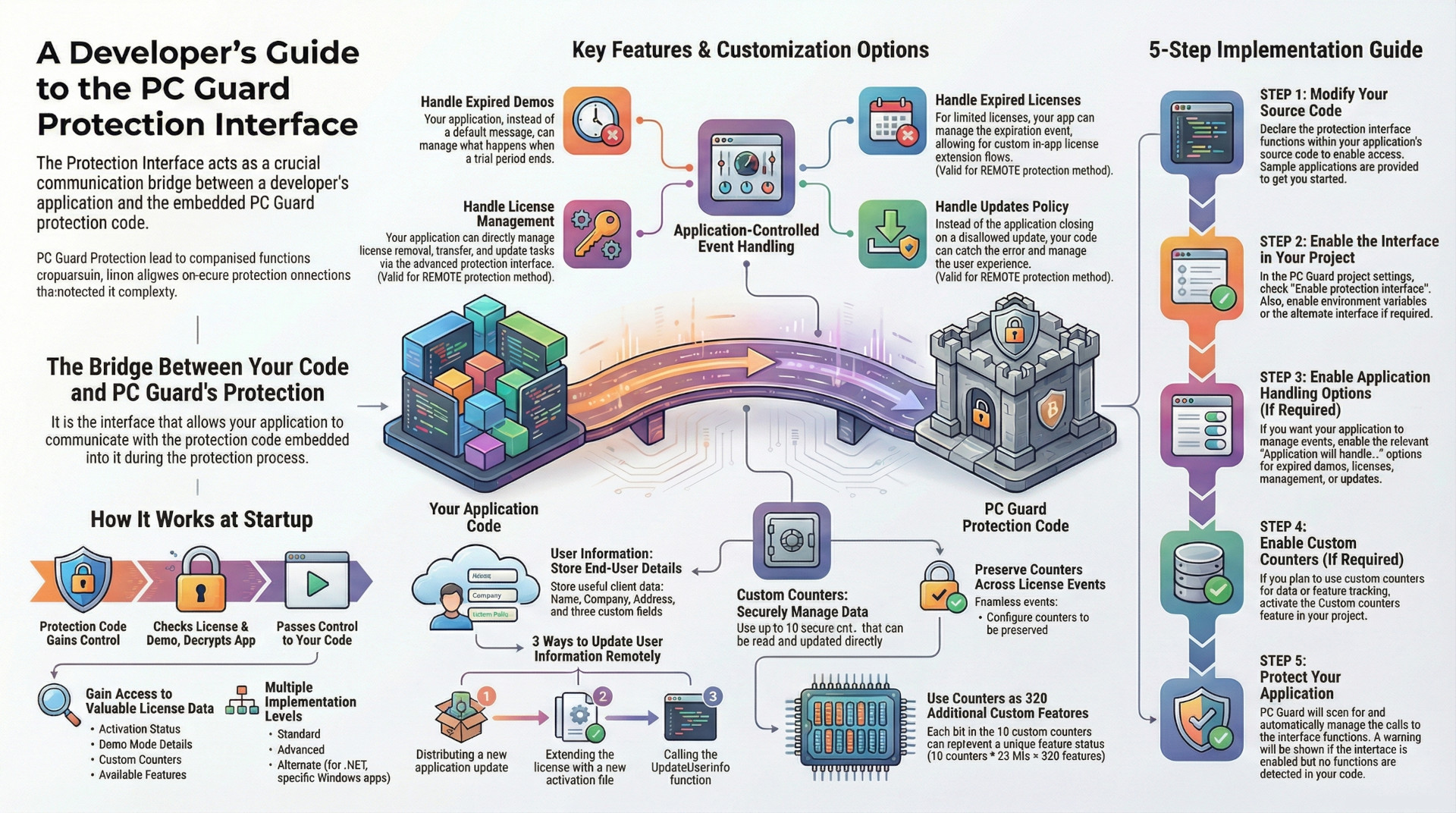
Protection Interface is a critical communication layer that enables a protected software application to interact directly with the embedded SOFPRO protection code. This interface allows the application to query license status, demo limitations, and other runtime data. More significantly, it provides a framework for developers to delegate responsibility for handling key licensing events away from the default protection mechanisms and into their own application logic.
This capability allows for a highly customized user experience, where the application itself can manage processes such as demo expiration, limited license expiration, license management (removal, transfer, updates), and software update policies. Instead of relying on generic dialog boxes provided by the protection code, developers can create a seamless, integrated workflow within their software.
Key extensibility features include "Custom Counters" and "User Information." Custom Counters provide ten secure 32-bit integer values that can be managed at runtime, which can also be leveraged as a bitmask to control up to 320 distinct custom application features. The "User Information" feature allows for storing end-user data directly within the license, which can be updated through new software releases, license extensions, or direct API calls. Implementation requires modifying the application's source code to call interface functions and enabling the corresponding options within the PC Guard protection project.
Core Concepts and Functionality
The Protection Interface serves as the fundamental bridge between the developer's application code and the SOFPRO protection code that is embedded during the protection process. Its primary purpose is to allow the application to "obtain license status and many other valuable information" and to "interact with protection code by calling advanced protection interface functions."
Operational Flow
Upon application startup, the SOFPRO protection code assumes control to perform a series of critical checks and initializations:
- Verifies the license status and demo limitations.
- Checks application integrity.
- Initializes required data, such as import functions and relocation tables.
- Decrypts the application.
- Passes control to the application's entry point.
By default, once control is passed to the application, the protection code does not affect its execution unless run-time encryption (RTE) is being used. The Protection Interface is necessary for any subsequent checks of license data, activation status, or custom values during the application's runtime.
Interface Levels
The system provides multiple implementations to suit different application types:
- Standard Protection Interface: The default level of implementation.
- Advanced Protection Interface: Enables more complex interactions, such as direct handling of license management tasks.
- Alternate Protection Interface: A specific implementation designed for all Microsoft .NET applications and other Windows applications that cannot use the default advanced interface.
Application-Controlled Licensing Events
A core capability of the Protection Interface is to transfer the responsibility for handling specific licensing events from the protection code to the developer's application. This is achieved by enabling specific options, all of which are disabled by default and require the Protection Interface to be active.
Handling Expired Demos
- Option:
Application will handle expired demo - Functionality: When a demo period (based on date or number of executions) expires, the protection code will not display its default activation dialog or evaluation expiration message. Instead, it marks the application as expired and passes control to the application's code.
- Requirements: The developer's application must use the Protection Interface to check the demo status and take appropriate action, such as displaying a custom purchase screen or disabling functionality. This option is valid for all protection methods and requires Demo Mode to be enabled with at least one limitation (date or execution).
Handling Expired Licenses
- Option:
Application will handle expired license - Functionality: Prevents the protection code from automatically locking the application when a limited license expires. The application becomes responsible for checking the license status via the Protection Interface and reacting accordingly.
- Requirements: This is valid for the
REMOTEprotection method when the limited license feature is enabled. It is particularly useful for controlling license extension processes directly from the application.
Handling License Management
- Option:
Application will handle license management - Functionality: The application takes full control over license management tasks, including removal, transfer, and update, via the advanced protection interface. This prevents the default activation dialog from appearing after a successful activation.
- Requirements: This option is available for the
REMOTEprotection method and requires at least one of the specified license management features to be enabled.
Handling Updates Policy
- Option:
Application will handle updates policy - Functionality: If an update is not allowed according to the defined policy, the protection code's default behavior is to display an error message and close the application. Enabling this option prevents this, allowing the application to handle the "not allowed" error by checking the value of
PCGI_UpdatesPolicyError. - Requirements: This is valid for the
REMOTEprotection method with the updates policy feature enabled.
Note: For the "handle expired demo," "handle expired license," and "handle license management" options, the "Special key pop-op option" and the -PCG_CL_SHOW command line option will not function as they normally would.
Data Management and Extensibility Features
The Protection Interface provides features for securely storing and managing custom data linked to the license.
Custom Counters
This feature allows the application to manage up to 10 secure 32-bit unsigned integer values.
- Scope: Counters are available for all protection methods and are shared by all applications protected with the same Application Signature and Program ID.
- Management: Default values are embedded during the protection process. At runtime, they can be read using the
GetInterfaceData()function and updated using theUpdateCustomCounters()function. For applications using theREMOTEprotection method, counters can also be changed via the license extension feature. - Persistence Options: Several options control whether counters are preserved or reset to default values after specific license events:
- Preserve counters after license expires.
- Preserve counters after license removal.
- Preserve counters after license transfer.
- Preserve counters after serial invalidation.
- Update Behavior: An update to the application can be configured to "Reset previous counters," which replaces the counters on a user's machine with new default values, provided the update has a higher Update ID.
Using Counters for Custom Features
A key capability of Custom Counters is their use as an extension for custom features. Each of the 10 counters is a 32-bit value, allowing each bit to represent the status of a feature (1 for enabled, 0 for disabled). This provides a mechanism for managing up to 320 (10 counters * 32 bits) additional feature flags within the application.
User Information
This feature is designed for storing end-user information within the protected application's license data. The data can be accessed at any time via the Protection Interface.
| Field | Maximum Length |
| Name | 50 characters |
| Address | 100 characters |
| Company | 100 characters |
| Custom User Info (1-3) | 50 characters per entry |
Updating User Information
There are three distinct methods to update this information on a remote machine:
- By Application Update: Distribute a new version of the application with an increased
Update IDand the "Reset previous user information" option enabled. - By License Extension: Issue an activation file to extend an existing license, with the new user information included.
- By API Call: Use the
UpdateUserInfoprotection interface function from within the application's code.
Implementation and Configuration
Implementing the Protection Interface involves a multi-step process that combines source code modification with project-level configuration.
Implementation Steps
- Modify Source Code: The developer must modify the application's source code to declare and call the necessary Protection Interface functions.
- Enable Interface Options: In the PC Guard project, the "Enable protection interface" option must be selected. Depending on the implementation, "Set environment variables" or "Enable alternate protection interface" may also be required.
- Enable Application Handling: If the application will manage licensing events, the corresponding "Application will handle..." options must be enabled.
- Enable Custom Counters: If the application uses custom counters, this feature must be explicitly enabled.
- Protect Application: During the protection process, PC Guard scans the application for calls to interface functions and manages them.
- Automatic Activation: PC Guard will automatically activate the protection interface if it detects calls to interface functions, even if the option was not manually enabled.
- Warning: A warning message will be displayed if the interface is enabled in the project but no corresponding function calls are detected in the application.
Key Configuration Options
The following table summarizes the primary options and their default status.
| Option Name | Default Status | Description |
| Enable protection interface | OFF | The master switch to enable communication between the application and the protection code. |
| Set environment variables | OFF | Stores protection interface data into environment variables for alternative access. |
| Enable alternate protection interface | OFF | Enables a specific interface version for MS .NET and other compatible Windows applications. |
| Application will handle expired demo | OFF | The protected application becomes responsible for managing the logic after a demo period expires. |
| Application will handle expired license | OFF | The application is responsible for handling the state of an expired limited license. |
| Application will handle license management | OFF | The application directly handles license removal, transfer, and updates via advanced interface functions. |
| Application will handle updates policy | OFF | Allows the application to manage the outcome when an update is denied by the updates policy. |
| Reset previous counters | OFF | Forces an application update to overwrite existing custom counters with new default values. |
| Preserve counters after license events | OFF | A set of options to prevent counters from resetting after license expiration, removal, transfer, etc. |
| Reset previous user information | OFF | Forces an application update to overwrite existing user information with new values from the project. |