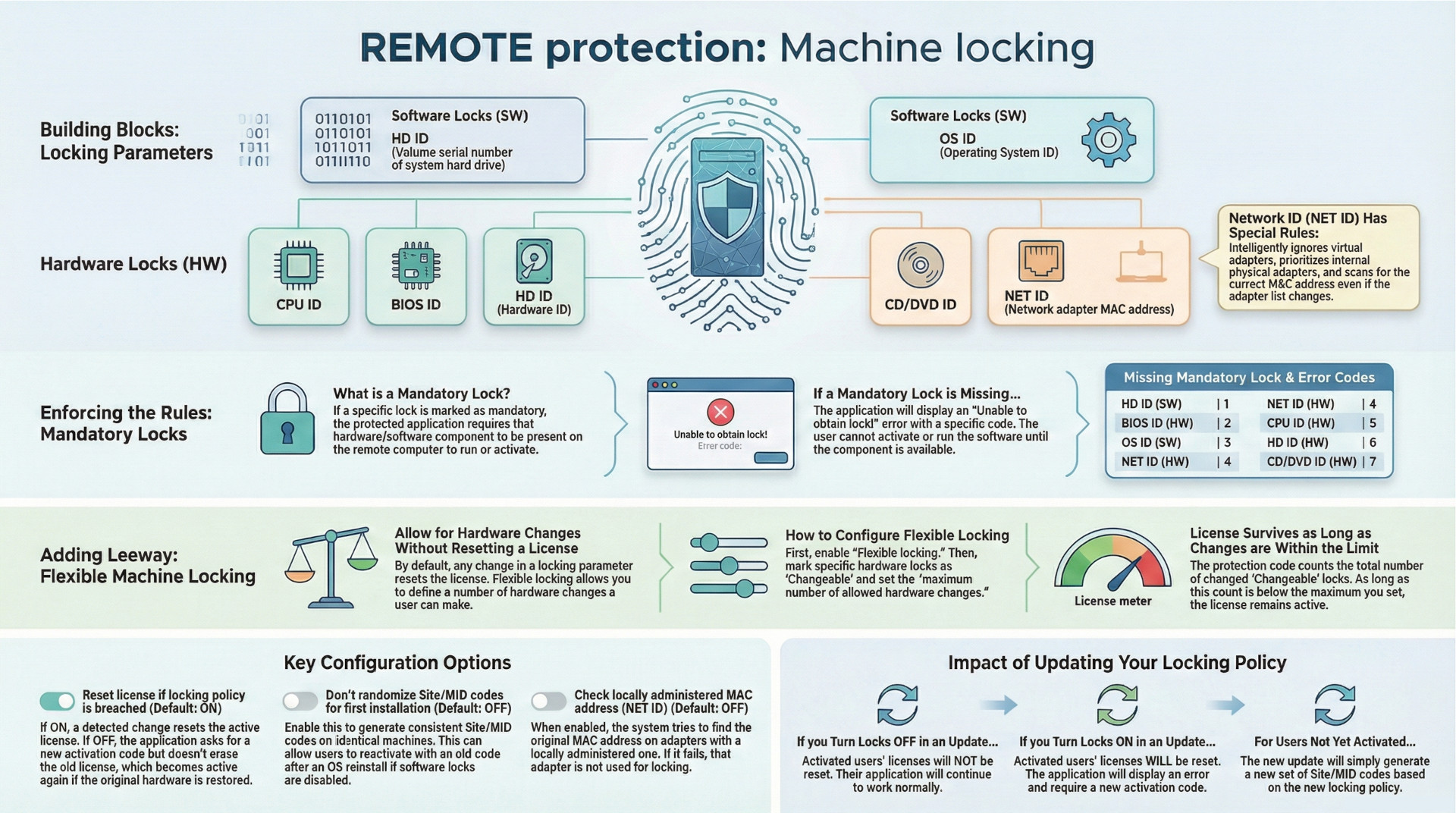
Article provides a comprehensive analysis of the machine locking features used for software protection, as detailed in the source materials. The core function of machine locking is to bind a protected application's license to a specific computer using a combination of software and hardware identifiers, known as "locking parameters." These parameters are used to generate unique Site/MID codes, which are central to the activation process.
Key features of the system include Mandatory Locks, which require the presence of a specific hardware or software component for the application to run, and Flexible Machine Locking, which permits a configurable number of hardware changes before triggering a license reset. The system provides granular control over network adapter (NET ID) locking, with specific rules for handling virtual, physical, and locally administered MAC addresses.
A breach of the locking policy, such as a hardware change exceeding the flexible limit, typically results in an automatic license reset, forcing the end-user to reactivate the software with a new code. The system's behavior can be customized through several options, including settings that control Site/MID code randomization and the precise response to a policy breach. All machine locking functionalities are exclusive to the REMOTE protection method.
Core Concept: Machine Locking
Machine locking is a policy enforcement mechanism designed to tie a protected application to a specific end-user machine. It is a feature available exclusively under the REMOTE protection method. The system works by generating a Site code and Machine ID (MID) based on a selection of hardware and software attributes of the remote computer. These codes are then used in the activation process. The values of the specific locking parameters from a remote machine can be reviewed by decoding its MID code in the activation panel, a feature useful for preventing fraudulent requests for new activation codes.
Locking Parameters
The system utilizes seven distinct locking parameters to identify a machine, categorized as either software (SW) or hardware (HW).
| Lock ID | Type | Description |
| HD ID (SW) | Software | Volume serial number of the system hard drive (OS drive). |
| OS ID (SW) | Software | Operating system ID. |
| HD ID (HW) | Hardware | Hard drive hardware ID. |
| CD ID (HW) | Hardware | CD/DVD hardware ID. |
| NET ID (HW) | Hardware | Network adapter hardware ID (MAC address). |
| CPU ID (HW) | Hardware | Processor ID. |
| BIOS ID (HW) | Hardware | Motherboard BIOS manufacturing date/revision. |
Detailed Analysis of NET ID (MAC Address) Locking
The NET ID (MAC address) locking parameter has a detailed and specific set of operational rules to ensure reliability:
- Adapter Selection:
- Virtual network adapters are automatically detected and are not used for locking.
- Only physical wired, wireless, and external USB adapters are considered.
- Internal Ethernet and SDIO adapters are given priority over external USB adapters. An external USB adapter is only used if no internal adapters are found.
- Detection Process:
- The protection code scans the list of available and enabled network adapters sequentially.
- The first adapter on the list that is suitable for locking is used to generate the Site/MID codes; all other adapters are then ignored.
- Post-Activation Behavior:
- On every subsequent run after activation, the protection code scans all network adapters to locate the one with the specific MAC address used for locking. This ensures the correct adapter is found even if the system's list of adapters changes.
- If the adapter used for locking is disabled or removed, the protection code will mark the lock as changed, which may lead to a license reset depending on the overall locking policy.
- Locally Administered MAC Addresses: An option, "Check locally administered MAC address (NET ID)," can be enabled. If an adapter's MAC address is locally administered, the code will attempt to find the original MAC address. If this fails, the adapter is not used for locking. If NET ID is also a mandatory lock, this failure will prevent the application from running.
Locking Policy Configuration
Mandatory Locks
Any of the seven locking parameters can be designated as mandatory.
- Function: If a lock is set as mandatory, the protected application requires its presence on the remote machine. For instance, if NET ID is mandatory, the user's computer must have at least one suitable network interface.
- Failure Condition: If the protection code cannot obtain a mandatory lock, it will display an error message: "Unable to obtain lock!" The application will not display the activation dialog and cannot be activated or run until the mandatory lock is available.
- Error Codes: The error message includes a code to identify the specific missing lock.
| Missing Mandatory Lock | Error Code |
| HD ID | 1 |
| BIOS ID | 2 |
| OS ID | 3 |
| NET ID | 4 |
| CPU ID | 5 |
| HD HW ID | 6 |
| CD HW ID | 7 |
Flexible Machine Locking
This feature customizes the default policy where any change to a locking parameter results in a license reset.
- Enabling: To use this feature, the "Flexible locking" option must be selected.
- Changeable Locks: Individual hardware locks can be marked as "Changeable." If a lock is not marked as changeable, any alteration to it will trigger a license reset (default behavior).
- Hardware Change Allowance: When multiple hardware locks are marked as changeable, a license reset will only occur if the total number of changed locks exceeds the "maximum number of allowed hardware changes." This maximum value should be less than or equal to the total number of parameters marked as changeable.
- Change Tracking: The tracking of changes is not cumulative. The system counts the total number of locks that differ from their original state at any given time. A lock changing back to its original value is no longer counted as a change.
Site/MID Code Randomization
By default, Site/MID codes are always randomized for enhanced security, ensuring different codes are generated even on identical machines.
- "Don't randomize Site/MID codes for first installation" Option: When this option is enabled (default is OFF), the Site/MID code is not randomized on the first installation.
- Effect: If software locking parameters (HD ID and OS ID) are also disabled, this allows the application to generate the same Site/MID codes after a hard drive format or OS reinstallation. This could permit a user to reactivate a previously removed, transferred, or expired license using their original activation code.
- Limitations: Even with this option enabled, Site/MID codes will still be randomized after events like an evaluation extension, license removal, license transfer, or license extension.
Handling of Locking Policy Breaches
A locking policy breach occurs when a change in locking parameters violates the configured rules. The system's response is governed by the "Reset license if locking policy is breached" option.
- Option Enabled (Default: ON):
- The active license is immediately reset (erased).
- A machine locking error message is displayed, and the application closes.
- On the next run, new Site/MID codes are generated, and the application requires a new activation code.
- Option Disabled:
- The currently active license is not reset.
- No error message is shown. Instead, the activation dialog appears with new, different Site/MID codes, requesting a new activation code.
- If a valid new code is entered, the application runs. If not, the application closes.
- On subsequent runs, the application will continue to ask for a new activation code as long as the policy is breached. If the breach is resolved (e.g., removed hardware is reinstalled), the application will start normally without requiring reactivation.
- Important Note: This option is mandatorily enabled and cannot be disabled if ACEN licensing is used or if the "Application will handle expired demo" option is set.
Operational Considerations
Impact of Updates on Locking Policy
When an update to a protected application is released with a different machine locking policy, the effect on remote computers varies:
- Not Activated: If the previous version was not activated, the new update will simply generate a new pair of Site/MID codes.
- Locks Turned OFF: If the previous version was activated and the new update only turns OFF some locking parameters, the existing license will not be reset, and the Site/MID code will remain unchanged.
- Locks Turned ON: If the previous version was activated and the new update turns ON additional locking parameters, the new update will display an error message, reset the license, and require a new activation.
System Behavior and Diagnostics
- The protection code scans all CD, DVD, hard drive devices, and network cards on each run.
- Changing the sequence of drives or the primary network adapter will not affect the license status.
- A license reset will be triggered only if a device used for locking is disabled, removed from the system, or replaced.