License alive (active) report task
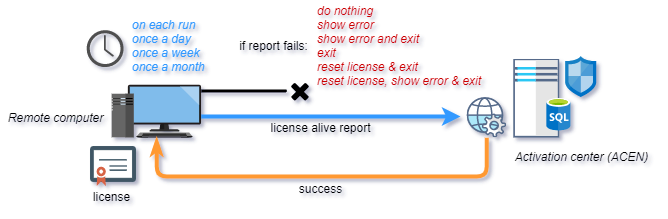
License alive task will send periodic license activity pings to ACEN server.
Timing
Use this option to select timing for license alive report.
| Timing | Description |
|---|---|
| on each run | run task on each run |
| once a day | run task once a day |
| once a week | run task every 7 days from first run |
| once a month | run task every 30 days from first run |
If report fails
Use this option to select action in case alive report fails. This usually happens because computer is not connected to the Internet.
| Action | Description |
|---|---|
| do nothing | no action, pass control to application. |
| show error | show error message and pass control to application. |
| show error and exit | show error message and close application. |
| exit | close application. |
| reset license & exit | reset local license and close application. |
| reset license, show error & exit | reset local license, show error message and close application. |
Threshold
Action threshold represents number of consecutive failed tasks before selected action is taken.
Valid values for threshold are 0-99 where 0 means no threshold (default).
Failed tasks counter will be reset to zero after each successful task.
If "If report fails" option is set to "do nothing" action threshold option is ignored.
Display errors during threshold period
By default, when a task fails and a threshold is configured, the application continues to run silently without displaying any feedback until the threshold period expires.
If this option is enabled and a threshold is set, any failure that occurs during the threshold period will immediately display the specific error message (such as network drops or unexpected server response errors) returned by the Activation Center (ACEN).
Exit code
Custom exit code in case action includes closing of protected application and returning of exit code. If left to default value (0) protected application will return status code returned by ACEN.
Since "Display errors during threshold period" can be configured independently for each task, enabling it for both tasks simultaneously may also cause consecutive error dialogs to appear on failure. If you wish to avoid multiple error prompts on the same day, enable this option only for the more critical task.