Product licensing settings section is used to manage and configure licensing models, default license quotas, floating (concurrent) licensing parameters, and subscription defaults for a product in the Activation Center (ACEN).
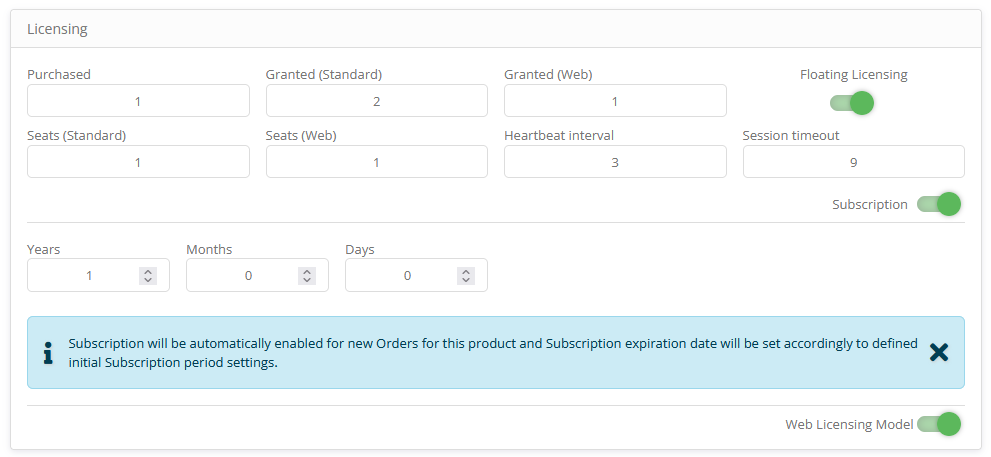
General & Quota Settings
| Option | Description |
|---|---|
| Purchased | Default number of purchased licenses inherited when creating new Orders for this product. |
| Granted (Standard) | Default maximum number of granted (allowed) license activations inherited by newly created Orders in the Standard licensing model. |
| Granted (Web) | Maximum number of granted (allowed) license activations per Serial Number in the Web licensing model. |
| Web Licensing Model | Enables or disables the Web licensing model (serial number-based activation without Client/Order records) for this product. |
Floating Licensing Settings New
Configure concurrent user limits and session tracking parameters. For Standard licensing, these values act as defaults inherited by new Orders. For Web licensing, these settings are enforced directly per Serial Number.
| Option | Description |
|---|---|
| Floating Licensing | Enables or disables the Floating (Concurrent) Licensing model for the product. Supported exclusively via the Web API interface (requires PC Guard 06.00.0971+ and ACEN 06.05.0400+). |
| Seats (Standard) | Default maximum number of simultaneous active users (concurrent seats) inherited by newly created Orders for this product. |
| Seats (Web) | Maximum number of simultaneous active users (concurrent seats) allowed simultaneously per individual Serial Number in the Web licensing model. |
| Heartbeat interval | Expected interval (in minutes) between periodic Running session heartbeat pings sent by protected applications. Inherited by new Orders and used directly for Web licenses. |
| Session timeout | Maximum allowed inactivity period (in minutes) before an unresponsive session (e.g., due to application crash or network loss) is considered expired and its floating seat is automatically released. |
Heartbeat & Session Timeout Recommendation
Make sure the Session timeout value is always set significantly higher than the Heartbeat interval (for example, 3x the heartbeat interval, such as a 3-minute heartbeat and a 9-minute timeout) and synchronized with your PC Guard project settings. Otherwise, active sessions may be prematurely marked as expired while the application is still running.
Subscription Settings
| Option | Description |
|---|---|
| Subscription | When enabled, Subscription is automatically activated for new Orders created for this product, and the Subscription expiration date is calculated based on the initial subscription period settings below. |
| Years / Months / Days | Defines the default initial Subscription validity period (in years, months, and days) applied to newly created Orders for this product. |