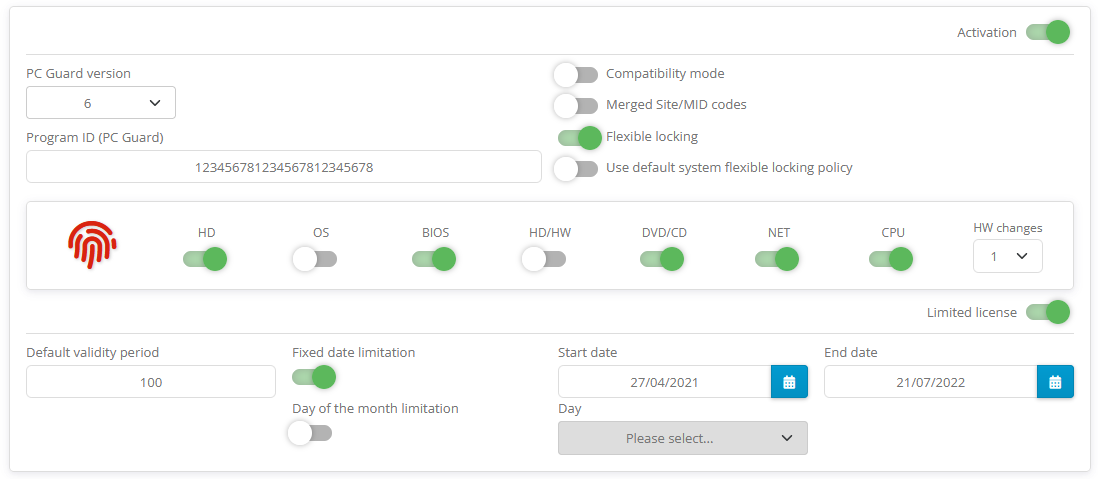
The Activation settings section defines the program protection properties, unique application identifiers, and licensing limitations for each product registered in the Activation Center (ACEN). These parameters allow you to configure flexible locking policies, control remote code execution rules, and manage license expiration boundaries.
| Option | Description |
|---|---|
| Activation | Toggle this option if activation is required for product. |
| PC Guard version | PC Guard version used for protection (5 or 6) |
| Program ID | Program ID as defined in PC Guard's remote protection settings. |
| Compatibility mode | Select to enable compatibility mode for site/mid codes for products protected with old version. |
| Merged Site/MID codes | Select to enable support for products protected with "Merge Site/MID codes into single code" option set. |
| Flexible locking | If enabled, flexible locking will be enabled for product. (default) If disabled, flexible locking will not be enabled for product. This means that user will not be able to reactivate licenses for this product and even single change in locking parameters will result in "Too many locking parameters are different" error. |
| Use default system flexible locking policy | If enabled, default system flexible locking policy will be used for this product. (default) If disabled, custom flexible locking policy will be used for this product. Valid flexible locking policy has to be set for this product in this case. |
| Limited license | Select to enable limited license |
| Default expiration period | Default limited license validity period (in days) |
| Fixed date limitation | Select to enable fixed date limitation for limited license. Both start and end date are required. |
| Day of the month limitation | Select to enable day of the month limitation and select day of month. |