The Serial numbers settings section provides the essential parameters for generating, validating, and managing serial numbers for each product within the Activation Center (ACEN). These options allow you to define distinct application signatures, set mathematical seeds for key generation, restrict valid ID ranges, and control the product's blacklist editor.
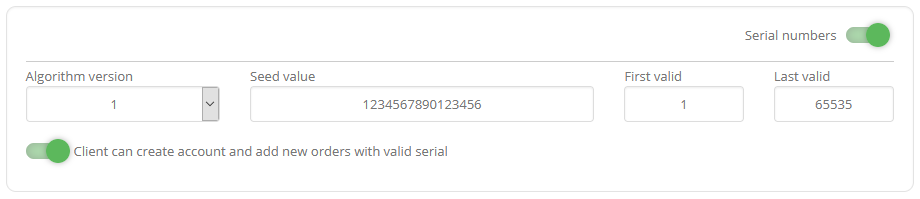
| Option | Description |
|---|---|
| Serial numbers | Select to enable serial numbers feature. |
| Application signature | Application signature value (as set in PC Guard's application info project settings). |
| Algorithm version | SN algorithm version. (currently not used) |
| Seed value | SN seed value. (16 characters long hexadecimal number as set in PC Guard's serial number project settings) |
| Valid serial numbers | Set first and last valid serial number ID. By default all serial number ID's are valid (1-65535) |
| Clients can create accounts and add new orders with valid serials | Select to allow clients to create their accounts and add new orders for this product with valid serial numbers. |
Blacklist editor
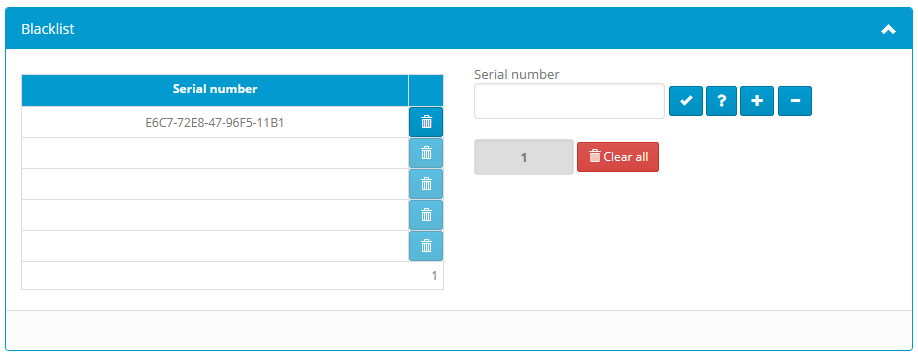
- Add serial number to blacklist.
- Check if serial number is already blacklisted.
- Validate serial number.
- Remove serial number from the blacklist.
- Delete specific serial number from blacklist.
Clear all - Delete all blacklisted serial numbers.
Clients can not create new accounts with blacklisted serials. They also can not manage licenses for existing orders with blacklisted serials ("ERROR: Serial number for this order is no longer valid." error message will be displayed in this case).