The License details page provides complete technical information about a specific license, including activation metadata, hardware identifiers, custom features and counters, removal status, and floating session controls.
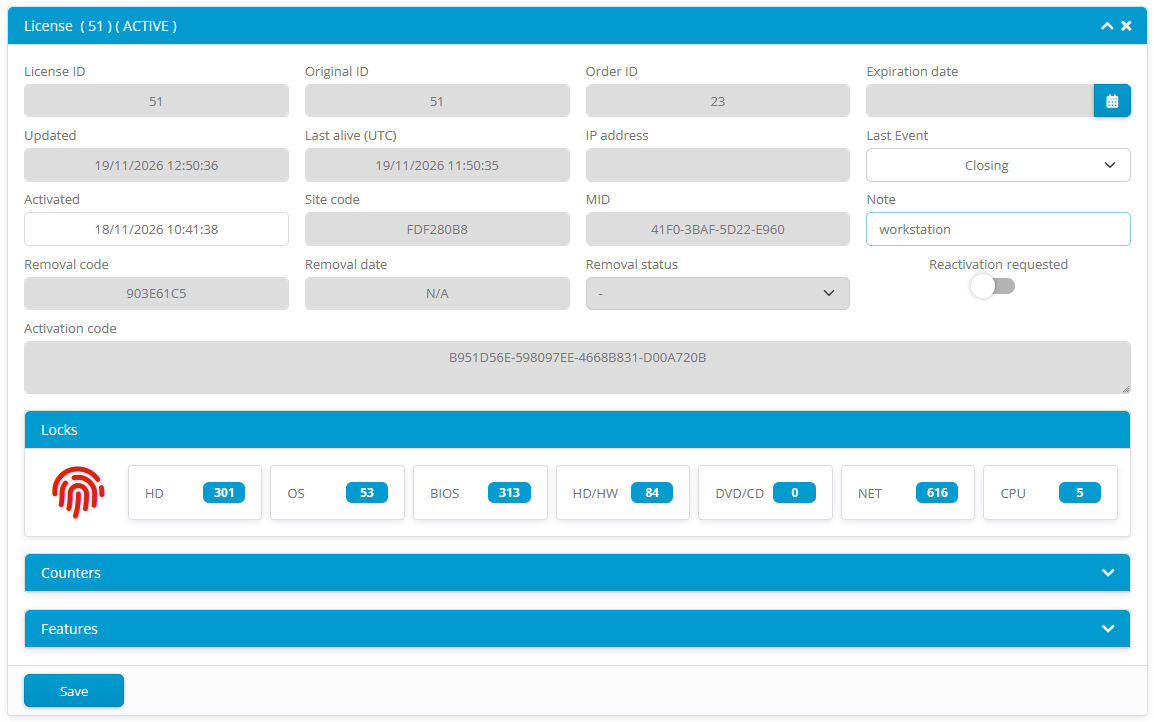
| Field | Description |
|---|---|
| License ID | Unique database identifier of the license record. |
| Original license ID | Reference to the original license ID if the license was transferred or re-activated. |
| Order ID | Unique identifier of the parent Order. |
| Activation date | Date and time when the license was activated. |
| Site code | Site code generated by the protected application on the client machine. |
| MID | Machine ID hardware fingerprint generated by the protected application on the client machine. |
| Expiration date | Limited license expiration date (if applicable). |
| Removal code | Removal code |
| Removal date | Date of license removal (empty if not removed) |
| Removal status | License removal status: Unknown, Removed, Reactivated, Replaced (admin), Transferred (admin) |
| Last Event New | Displays the latest reported floating session event (Unknown, Starting, Running, or Closed) along with the UTC timestamp. Administrators can manually change the session status (for example, setting a stuck session to Closed) to immediately release a floating seat. |
| Activation code | Activation code issued for the client workstation. |
| Note | Optional note attached to the license. |
| Machine locks | Hardware locking parameters bound to this license. |
| Counters | Custom licensing counters |
| Features | Custom feature flags configured for this license |